:::
![]()
![]()
![]()
![]()
![]()
![]()
![]()
![]()
![]()
![]()
![]()
![]()

雜談:Home Assistant從開發板遷移到虛擬機器 / Talk: Migrating Home Assistant From a Development Board to a Virtual Machine
布丁布丁吃布丁
雜談:Home Assistant從開發板遷移到虛擬機器 / Talk: Migrating Home Assistant From a Development Board to a Virtual Machine

我原本拿來架設Home Assistant的OrangePie掛點了。藉這個機會,我將整個Home Assistant改在Proxmox VE架設。這裡記錄一下整個過程。
(more...)修改Zotero本機的轉譯器 / Modifying Zotero's Local Translators
布丁布丁吃布丁
修改Zotero本機的轉譯器 / Modifying Zotero's Local Translators

如果你覺得用Zotero引用資料時,欄位的值不太正確,那通常都是轉譯器的問題。我們可以試著去修改轉譯器,然後在Zotero Connector裡按下「Reset Translators」按鈕讓修改後的轉譯器生效。
If you find that the field values are incorrect when citing materials using Zotero, it's usually a translator issue. We can try modifying the translator and then click the "Reset Translators" button in the Zotero Connector to apply the changes.
(more...)雜談:奔跑吧,CPU小貓! / Talk: Run, CPU Cat!
布丁布丁吃布丁
雜談:奔跑吧,CPU小貓! / Talk: Run, CPU Cat!
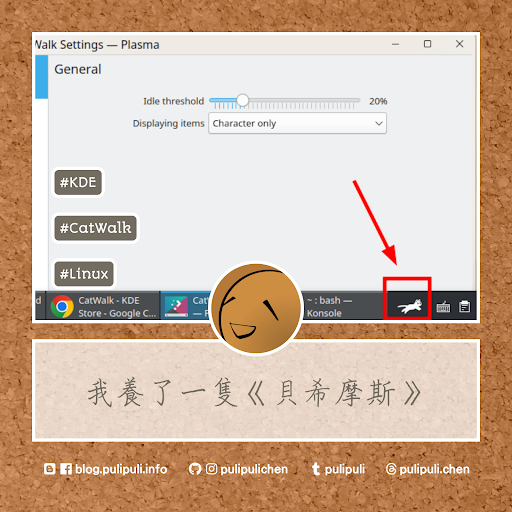
有段時間桌寵概念挺流行的。大家都想要在桌面養個什麼玩意兒來分散自己寶貴的注意力。後來我也決定在工作列裝個CatWalk,看小貓配合我努力工作時狂奔。
(more...)你的CITATION.cff格式正確嗎? 用CITATION.cff驗證工具來檢查吧! / Is Your CITATION.cff Format Correct? Check It With the CITATION.cff Validator!
布丁布丁吃布丁
你的CITATION.cff格式正確嗎? 用CITATION.cff驗證工具來檢查吧! / Is Your CITATION.cff Format Correct? Check It With the CITATION.cff Validator!

CITATION.cff是用於記錄供人引用資訊的一種YAML純文字格式。那要怎麼知道自己寫的CITATION.cff是否正確呢?我們可以用R套件cffr來驗證。我在Colab把它寫成了可以線上使用的CITATION.cff驗證工具了,讓我們一起來看看怎麼使用吧。
CITATION.cff is a plain text YAML format for recording citation information. How can you tell if your CITATION.cff is correct? We can use the R package cffr for validation. I've created an online CITATION.cff validator using Colab. Let's take a look at how to use it.
(more...)如何將螢幕畫面擷取成圖片? / How to Capture a Screenshot?
布丁布丁吃布丁
如何將螢幕畫面擷取成圖片? / How to Capture a Screenshot?

本篇將說明如何在桌上型電腦Windows、Linux、MacOS以及行動裝置的Android、iPhone或iPad上擷取螢幕畫面。大多時候,其實我們都可以用鍵盤上的快速鍵「PrtSc」來擷取畫面。
This article explains how to take screenshots on desktop Windows, Linux, MacOS, and mobile devices like Android, iPhone, or iPad. Most of the time, we can use the "PrtSc" hotkey on the keyboard to capture the screen.
(more...)雜談:Home Assistant在遠端電腦播放聲音 / TALK: Playing Audios on a Remote Computer with Home Assistant
布丁布丁吃布丁
雜談:Home Assistant在遠端電腦播放聲音 / TALK: Playing Audios on a Remote Computer with Home Assistant

結論寫在前面,最後我還是在Home Assistant使用vlc-telnet播放聲音,這是最簡單的做法了。
(more...)GitHub上的軟體作品也能申請DOI:Zenodo與Github設定教學 / Software Projects on GitHub Can Also Apply for DOIs: A Tutorial on Zenodo and GitHub Configuration
布丁布丁吃布丁
GitHub上的軟體作品也能申請DOI:Zenodo與Github設定教學 / Software Projects on GitHub Can Also Apply for DOIs: A Tutorial on Zenodo and GitHub Configuration

有人注意到我的GitHub保存庫出現了DOI的標示嗎?DOI是學術界確保數位資源能夠長期被人取用的重要方法,常用於學術期刊文章上。但其實任何數位資源都可以註冊DOI,包括發佈在GitHub上的軟體。有了DOI,大家就更容易引用你的作品,也可以為你的作品留下一個確確實實存在的記錄。那麼到底怎麽為GitHub申請DOI?又怎麼讓DOI的徽章出現在GitHub儲存庫的首頁?這篇就讓我們一起來看看怎麼做吧。
Has anyone noticed the DOI badge appearing on my GitHub repositories? DOIs are crucial in academia for ensuring the long-term accessibility of digital resources and are frequently used for journal articles. However, any digital resource can be assigned a DOI, including software hosted on GitHub. With a DOI, it becomes easier for others to cite your work and provides a permanent record of its existence. So, how do you get a DOI for your GitHub repository, and how do you display the DOI badge on your repository's homepage? Let's explore how to do just that in this post.
(more...)雜談:用Dify跟Stable Diffuision製作投影片章節的封面照片 / Talk: Creating a Cover Image for Slide Section Using Dify and Stable Diffusion
布丁布丁吃布丁
雜談:用Dify跟Stable Diffuision製作投影片章節的封面照片 / Talk: Creating a Cover Image for Slide Section Using Dify and Stable Diffusion

為投影片的內容選擇合適的照片真不是一件容易的事情。於是我就試著將投影片的內容傳送給大型語言模型,請大型語言模型撰寫適合Stable Diffusion的提示詞,然後用提示詞來繪圖看看。這樣的工作流會出現什麼結果呢?
(more...)來看看3D掃描儀掃描了什麼模型吧 / Let's See What Models the 3D Scanner Scanned
布丁布丁吃布丁
來看看3D掃描儀掃描了什麼模型吧 / Let's See What Models the 3D Scanner Scanned

之前我在幾次「數位化與延展實境工作坊」裡面都有介紹到3D掃描儀REVOPOINT POP3。工作坊的過程也常常聽到同學讚歎掃描儀的表現。到底大家在工作坊裡面掃描了什麼東西呢,讓我們一起來看看吧。
In previous "Digitalization and Extended Reality Workshops," I've introduced the REVOPOINT POP3 3D scanner. During the workshops, I often heard participants praising the scanner's performance. So, what exactly did everyone scan during these workshops? Let's take a look.
(more...)淡江113學年度資訊週推廣活動:數位化與延展實境工作坊 / Digitalization and Extended Reality Workshop: Tamkang University Information Week 2024
布丁布丁吃布丁
淡江113學年度資訊週推廣活動:數位化與延展實境工作坊 / Digitalization and Extended Reality Workshop: Tamkang University Information Week 2024
「當數位典藏走進元宇宙:數位化與延展實境工作坊」又來開講囉!這次是面向同學們的工作坊活動,主要介紹3D掃描儀REVOPOINT POP3 跟 XR裝置 Meta Quest 3。讓我們一起來看看活動內容講了什麼吧!
"When Digital Archives Enter the Metaverse: Digitization and Extended Reality Workshop" is back! This time, it's a workshop geared towards students, primarily introducing the REVOPOINT POP3 3D scanner and the Meta Quest 3 XR device. Let's take a look at what the event covered!
(more...)雜談:回頭閱讀舊的RSS文章 / TALK: Looking Back on Old RSS Posts
布丁布丁吃布丁
雜談:回頭閱讀舊的RSS文章 / TALK: Looking Back on Old RSS Posts

看著RSS未讀文章的數量逐漸減少,其實也像是一種生活成就。
(more...)為什麼影印機讀不到隨身碟?分割表格式的問題與解法 / Why Can't the Copier Read My USB Drive? Problems and Solutions Related to Partition Table Formats
布丁布丁吃布丁
為什麼影印機讀不到隨身碟?分割表格式的問題與解法 / Why Can't the Copier Read My USB Drive? Problems and Solutions Related to Partition Table Formats

對軟體工程師來說,隨身碟的功能大多是刷ISO映像檔拿來安裝作業系統。但刷完之後再重新格式化,此時要拿它去影印機等裝置存儲檔案,又會發現隨身碟不能讀取了。原來這背後的原因,是因為「分割表格式」被設定為GPT的緣故。「分割表格式」到底是什麼?為什麼會被設定為GPT?要怎麼解決?就讓我們一起看下去吧。
For software engineers, USB drives are often used to flash ISO images for installing operating systems. However, after flashing and reformatting the drive, it often becomes unreadable by devices like copiers. The reason behind this lies in the " Partition Table Format" being set to GPT. What exactly is a " Partition Table Format"? Why is it set to GPT? And how can this issue be resolved? Let's delve into these questions.
(more...)
訂閱:
意見 (Atom)


Comments